
LinkedIn Video: What to Post and What to Skip
 Bas Smeets9 min read
LinkedIn video builds familiarity faster than any other format. For coaches, that matters. Clients hire people they trust, and trust comes from feeling like they know you. Video shortens that gap significantly.
The barrier that keeps most coaches from posting video on LinkedIn is not technical. It is psychological. Seeing yourself on camera, knowing your professional network is watching, feels different from writing a post. That discomfort is also exactly why video works: the coaches willing to show up on camera stand out in a feed full of text.
Why does LinkedIn video work for coaches?
Three reasons that matter specifically for coaching, not just for content creators in general.
First, coaching is a personal service. People are not buying a product, they are deciding whether to spend hours in conversation with you about something that matters to them. A two-minute video gives them more information about who you are than twenty text posts. The way you pause. The directness of your thinking. Whether you sound like someone they could be honest with.
Second, video is undersupplied on LinkedIn. Most coaches avoid it, which means the ones who do post video face far less competition for attention than they do in the text feed.
Third, LinkedIn's algorithm has consistently given video content solid organic reach, particularly native uploads (video uploaded directly to LinkedIn, not shared from YouTube or another platform).
Native video vs shared links
Always upload video directly to LinkedIn rather than sharing a YouTube or Vimeo link. LinkedIn suppresses reach on posts with external links. Native video plays automatically in the feed and gets significantly more reach than a thumbnail link to an external video.
What should coaches post on LinkedIn video?
The formats that work best for coaches are not polished productions. They are direct, specific, and short.
The one-insight video
Two minutes. One idea from your coaching practice. No intro music, no title cards, no "hi guys welcome back." Start mid-thought. "I had a client ask me something last week that I am still thinking about." Then say what it was and what you made of it. That is the whole video.
The myth-bust
"Something I hear a lot that I think is wrong." Say it, explain why, offer your actual view. This is the video equivalent of the counterintuitive text post hook, and it works for the same reasons: it creates productive disagreement and makes people want to see where you land.
The process walkthrough
Explain one thing you do in coaching sessions and why. "The first question I ask every client is this, and here is what it opens up." This shows your methodology without requiring a brochure. Clients who watch it get a real sense of how you work. Making your coaching methodology visible on LinkedIn covers this angle across formats.
The reaction video
React to something you read or heard that connects to your coaching niche. A statistic about burnout. A common career advice trope you think is misleading. A question a client asked that shifted how you think. You do not need an occasion, just a genuine reaction to something real.
Start recording before you are ready
Most coaches spend more time preparing for a video than recording it. The preparation is often procrastination. Set a two-minute timer, press record, say one thing you actually think. If it is bad, delete it. But usually it is not as bad as the version in your head, and imperfect video that sounds like a real person outperforms polished video that sounds rehearsed.

How long should LinkedIn videos be for coaches?
One to three minutes for most content. Long enough to make a point properly, short enough that someone watching in a feed will stay to the end.
LinkedIn allows videos up to ten minutes, but completion rates drop sharply above three minutes for most audiences. The exception is educational content where someone has specifically chosen to watch, tutorial-style videos can hold attention longer if the topic is specific enough.
For building familiarity and trust, short and frequent beats long and occasional every time. A two-minute video twice a week is more effective than a ten-minute video once a month.
What LinkedIn video format should coaches skip?
Heavily produced videos with intro sequences, lower thirds, background music, and multiple camera cuts. Not because production quality is bad, but because it signals effort that does not match the LinkedIn feed environment. Viewers are scrolling between a post about career transitions and someone's company announcement. A slick corporate video interrupts that environment in a way that feels off.
Also skip: talking head videos where you read from a script. Viewers can tell. The eyes move differently. The cadence is wrong. If you need notes, glance at them, but speak to the camera the way you would speak to a client, not the way you would read a document.
Personally, I've felt uncomfortable on video for a very long time. I was that person that created scripts and then tried to memorize them of read them from a teleprompter app. Luckily right now, I can record video's quickly and that's mainly because I've seen that natural videos that are not perfect perform even better.
Still, using video is always a personal choice. For me, it's not my favorite thing to do, so you won't see a lot of video's of me on LinkedIn.
Do you need professional equipment to post LinkedIn video?
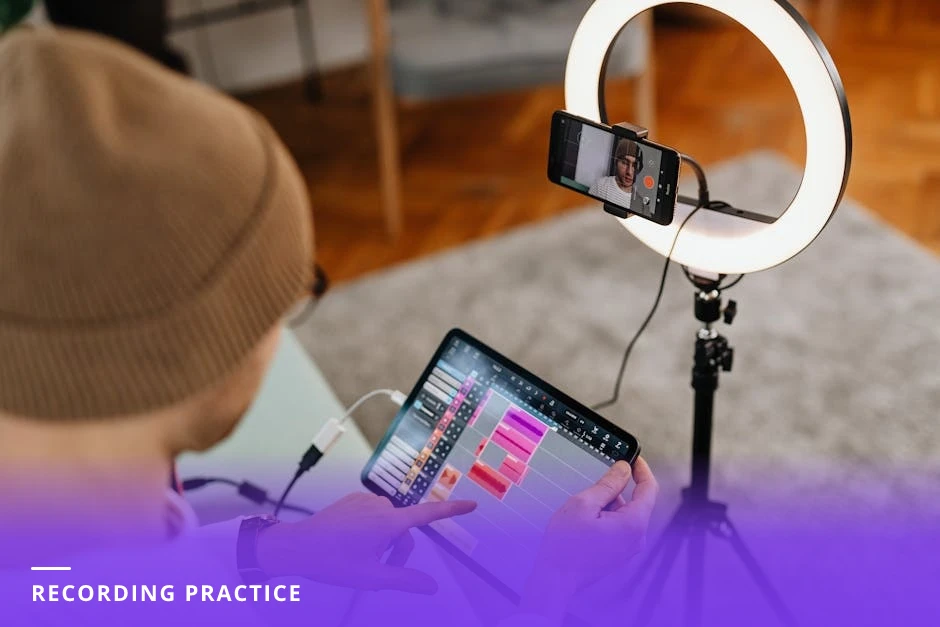
No. A phone propped against a stack of books, decent natural light from a window in front of you, and a quiet room is enough. Most high-performing coaching video on LinkedIn is filmed on a phone in a home office or kitchen.
The one thing worth investing in early is audio. Bad video with good audio is watchable. Good video with bad audio is not. A simple lapel microphone that plugs into your phone costs around €20 to €30 and eliminates most room echo problems.
Minimum viable video setup
Phone on a tripod or propped up. Face a window so natural light hits your face, not your back. External microphone if you are in an echoey room. Record in the native camera app. Upload directly to LinkedIn. No editing required for most coaching video, a clean start and a natural end is enough.
How often should coaches post video on LinkedIn?
Once or twice a week if you can, once a week at minimum if you want video to be a meaningful part of your content mix. Below once a week and you are not building the familiarity effect that makes video valuable for coaches.
The coaches who get the most from LinkedIn video post consistently rather than perfectly. Two slightly imperfect videos a week for three months will build more trust than one polished video a month.
If adding video feels like too much on top of text posts and carousels, start by replacing one text post per week with a video on the same topic you would have written about. Same idea, different format. This keeps your posting frequency consistent while introducing video without adding to your workload. How often to post on LinkedIn covers the overall cadence question in detail.
What to post vs what to skip: a quick summary
Post: One-insight videos, myth-busts, process walkthroughs, genuine reactions to things in your niche
Post: Raw, direct, phone-filmed content that sounds like you thinking out loud
Skip: Heavily produced intros and outros that feel corporate
Skip: Videos where you are clearly reading from a script
Skip: Sharing YouTube links instead of uploading natively
CoachCraft helps coaches figure out what to say on video by turning their coaching knowledge into structured content ideas. Try it free at coachcraft.io.
Frequently asked questions
Should coaches post video on LinkedIn?
Yes. Video builds trust faster than text because viewers get a real sense of who you are and how you think. For coaches, where the client relationship is personal, that familiarity matters more than in most industries.
What kind of videos work on LinkedIn for coaches?
Short, direct, one-idea videos filmed on a phone. One insight from your coaching practice, a myth you want to push back on, or a process you use with clients. No production value required, authenticity outperforms polish on LinkedIn.
How long should my LinkedIn videos be?
One to three minutes for most coaching content. Completion rates drop sharply above three minutes for feed-based video. If you have a lot to say, break it into two shorter videos rather than one long one.
Do I need special equipment to film LinkedIn videos?
No. A phone, a window for natural light, and a quiet room are enough to start. If audio quality is an issue, a simple lapel microphone makes a significant difference and costs under €30.
Will LinkedIn video get more reach than text posts?
Not automatically. LinkedIn video gets good organic reach, but reach is still driven primarily by early engagement. A video that gets comments and shares in the first hour will reach more people than one that does not, regardless of format.
Should I add captions to my LinkedIn videos?
Yes. A significant percentage of LinkedIn video is watched without sound. LinkedIn has an auto-caption feature built into the video uploader. Use it, and review the captions for errors before posting.
How do I get comfortable on camera for LinkedIn videos?
Record and delete. Set a two-minute timer, talk about one thing you know well, watch it back without judgement. Do this ten times and the discomfort drops significantly. The goal is not to feel natural immediately but to do it often enough that natural becomes the default.
For a complete overview, see our The LinkedIn Content Strategy for Coaches: What Actually Works in 2026.
Create LinkedIn Content That Converts
Join career coaches using CoachCraft to build their LinkedIn presence.
Get Started Free